New in 1.1 Blocks, Collections & Quick Access

Save it once.
Reuse it for real work.

WrapKit helps you save reusable work as Blocks, organize it into Kits, and create a new Wrap whenever that work becomes real.

Free to start · Requires macOS 15.0 or later

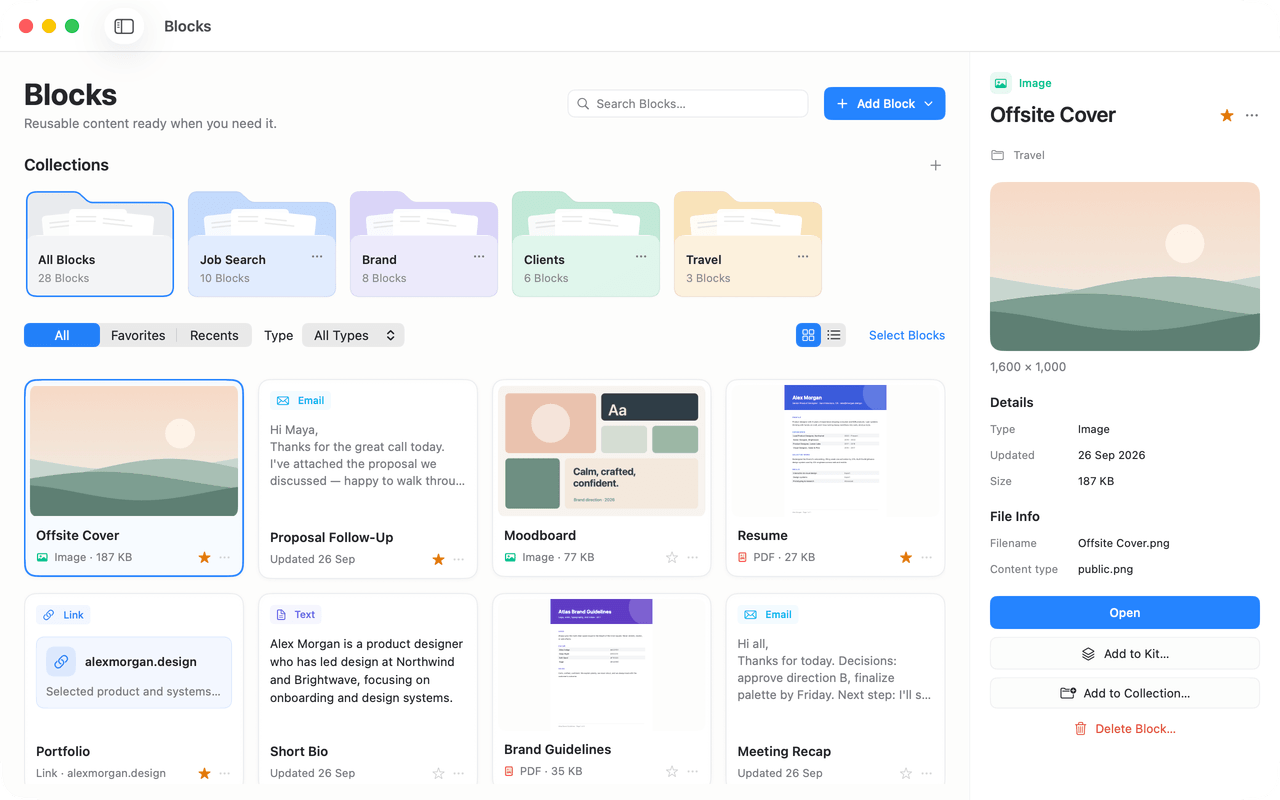
WrapKit Blocks library showing Collections for Job Search, Brand, Clients, and Travel, a grid of reusable image, email, PDF, link, and text Blocks, and an inspector for the selected Offsite Cover image.

How it works

Blocks. Kits. Wraps.

Save files once as Blocks, organize them into Kits, and create a Wrap whenever you need to send them.

  1. Blocks

    Save reusable content once — text, emails, links, images, PDFs, and files.

  2. Kits

    Bring together the Blocks you need for work you do again and again.

  3. Wraps

    When real work comes up, create a Wrap from your Kit, personalize it, and get everything ready to send.

Example: Job Application Kit, with Wraps for Lumen Labs, Brightwave, and Halcyon.

Blocks

Save anything worth keeping.

A useful email. A text snippet. An image you found online. A PDF, link, or file you know you’ll need again.

Save it as a Block and keep it ready to reuse.

  • Text
  • Email
  • Link
  • Image
  • PDF
  • File

Collections

Keep similar Blocks together.

Group things like email templates, brand assets, useful images, client files, or research into Collections so they’re easier to find later.

Close-up of Collections in WrapKit — All Blocks, Job Search, Brand, and Clients — above filters and Blocks including an image, an email, and a moodboard.

From anywhere on your Mac

Two shortcuts. Every app.

Both work in any app while WrapKit is running. Change either one in Settings → Shortcuts.

Save to Blocks

Capture something while you work in another app — copy it, press the shortcut, and save it as a reusable Block without switching to WrapKit.

  1. 1
    Copy itSelect text, a link, an image, a PDF, or a file and press ⌘C.
  2. 2
    Press A small panel shows what you copied.
  3. 3
    Save to BlocksCheck the title, then save. Nothing is saved until you do.

WrapKit reads your clipboard only when you press the shortcut.
Quick Access

Find, open, or copy your Blocks, Kits, and Wraps from any app, without navigating through WrapKit first. Your recent work is there before you type.

  • Text, Email, and Link Blocks are copied, ready to paste.
  • Image, PDF, and File Blocks open in their default app.
  • Kits and Wraps open in WrapKit.

Press Esc, or the shortcut again, to close it.

Kits

Build a reusable setup for a specific kind of work.

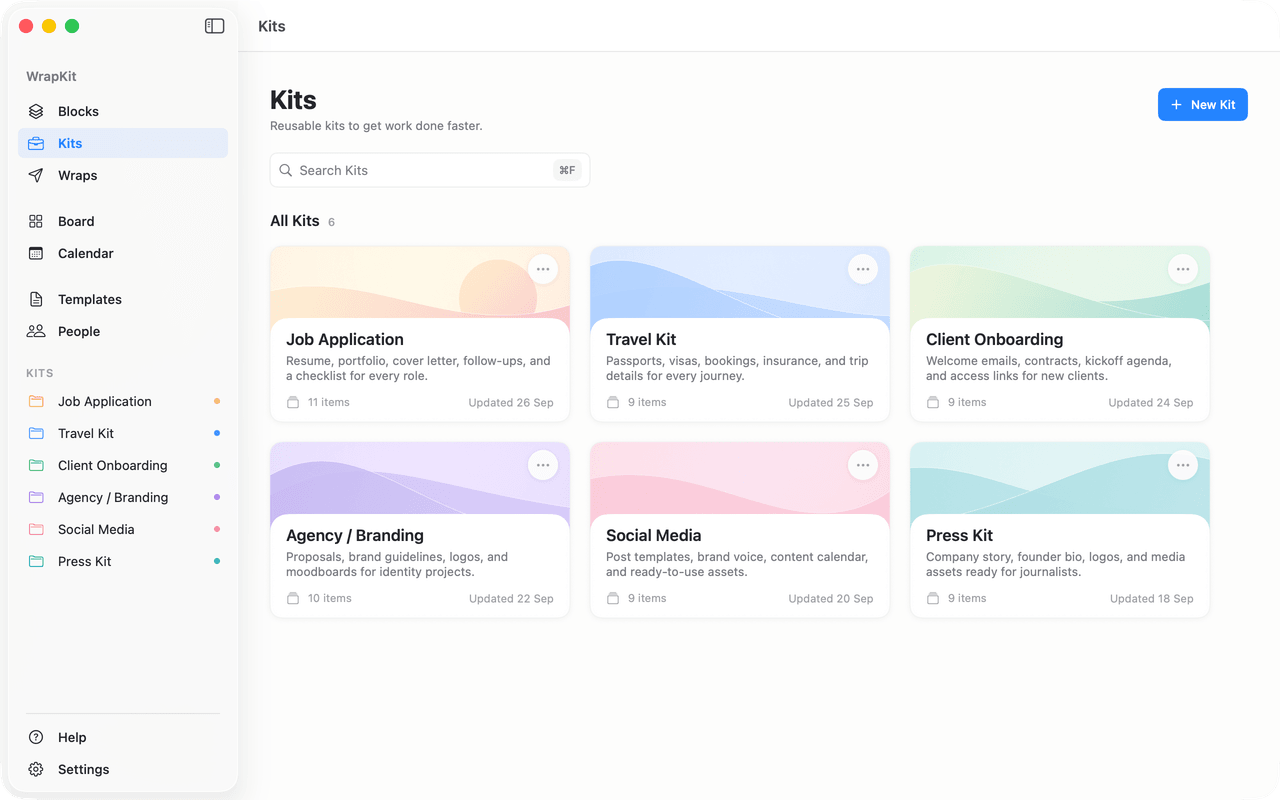
Bring together the Blocks you need for something you do repeatedly — like a job application, client onboarding, brand sponsorship, or travel.

  • Emails
  • Text
  • Documents
  • Links
  • Images
  • Files
  • Personalization fields
  • Checklists
WrapKit Kits library with six Kits: Job Application, Travel Kit, Client Onboarding, Agency / Branding, Social Media, and Press Kit.

Made for repeatable work

Your Kits can power every kind of repeatable work.

Use Kits to keep the right files organized for repeatable work. Whether it’s a job application, a trip, or client onboarding, each Kit keeps everything ready in one place.

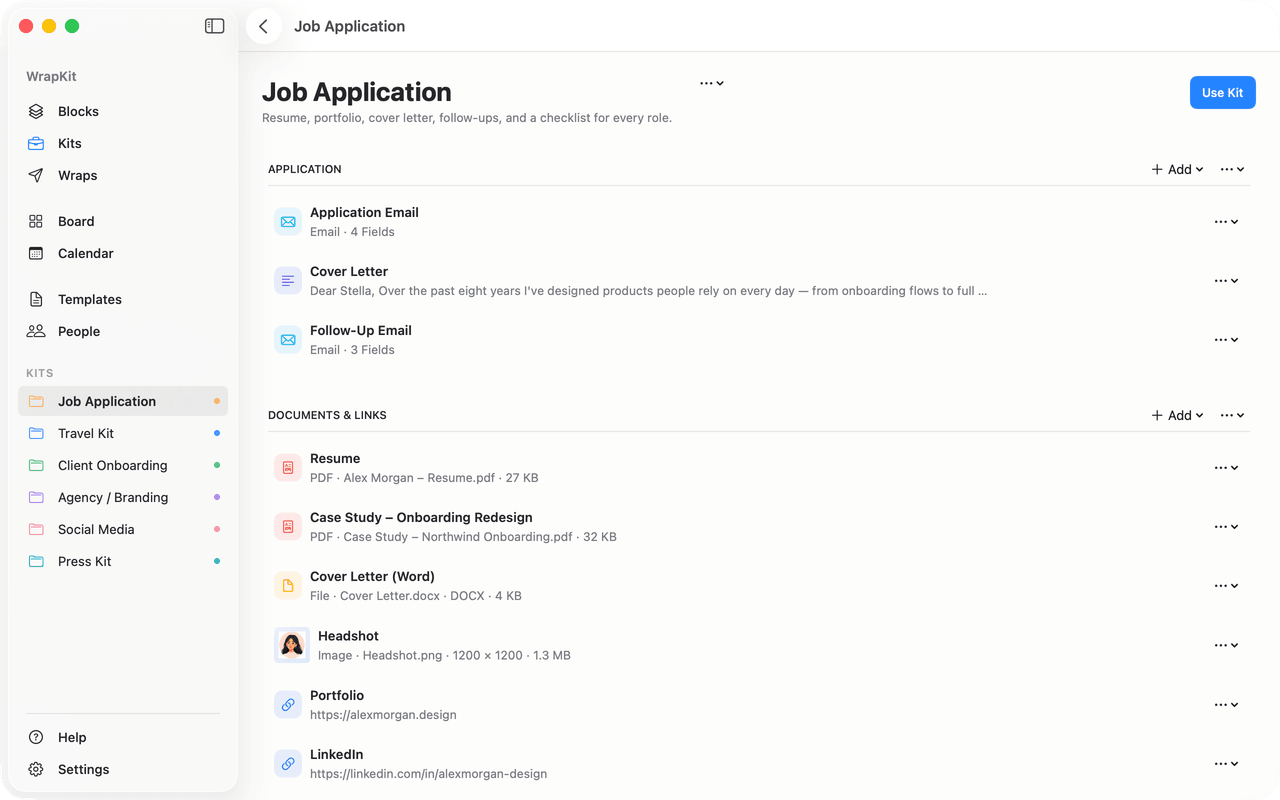
Job Application Kit workspace with an application email, cover letter, and follow-up email, plus a resume PDF, case study, headshot image, portfolio, and LinkedIn links.
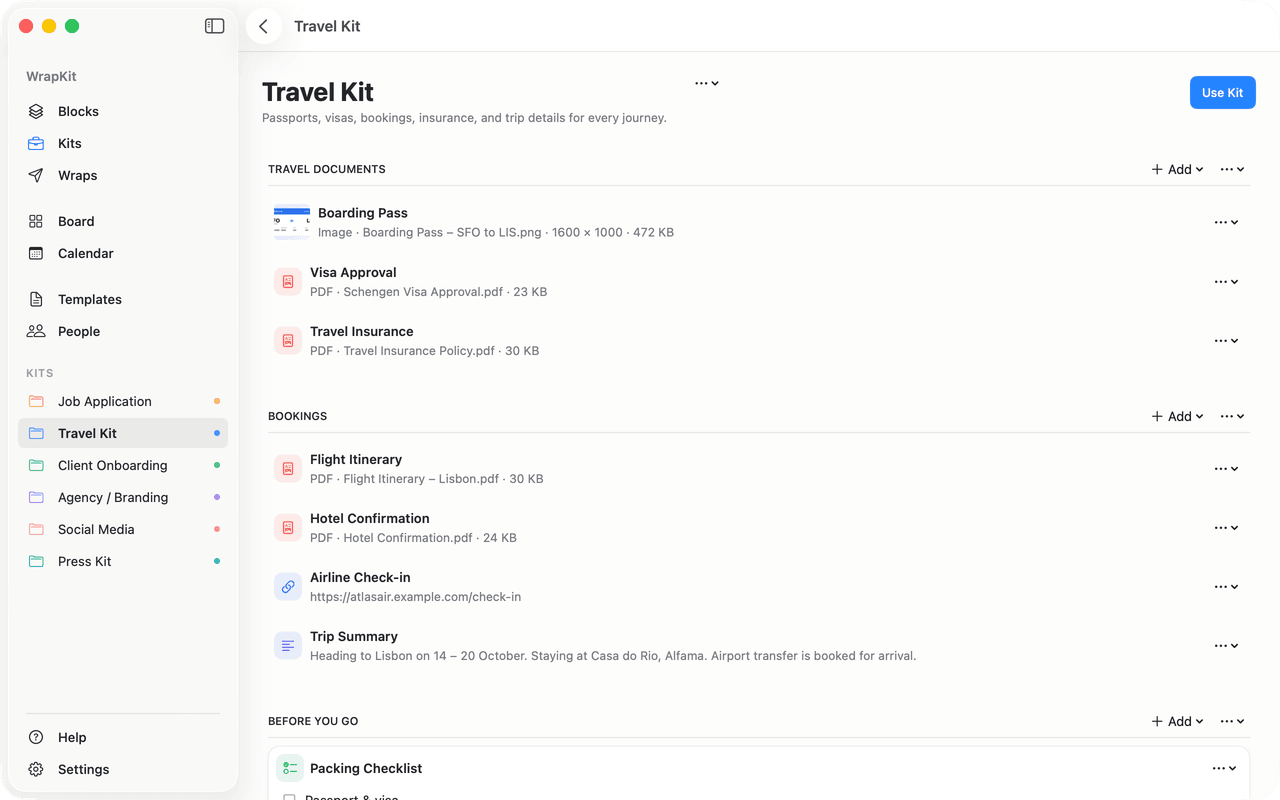
Travel Kit workspace with a boarding pass image, visa approval and insurance PDFs, flight and hotel bookings, an airline check-in link, a trip summary, and a packing checklist.

Job Application. Emails, résumé, case study, headshot, and links — ready for every role.

Travel Kit. Boarding pass, visa, insurance, bookings, and a packing checklist.

One Kit, a new Wrap each time

  • Job ApplicationA Wrap for each role
  • Client OnboardingA Wrap for each client project
  • Brand Sponsorship PitchA Wrap for each brand campaign
  • Influencer Media KitA Wrap for each brand
  • Press KitA Wrap for each publication
  • Travel KitA Wrap for each trip

Personalization

Personalize reusable content without rewriting it.

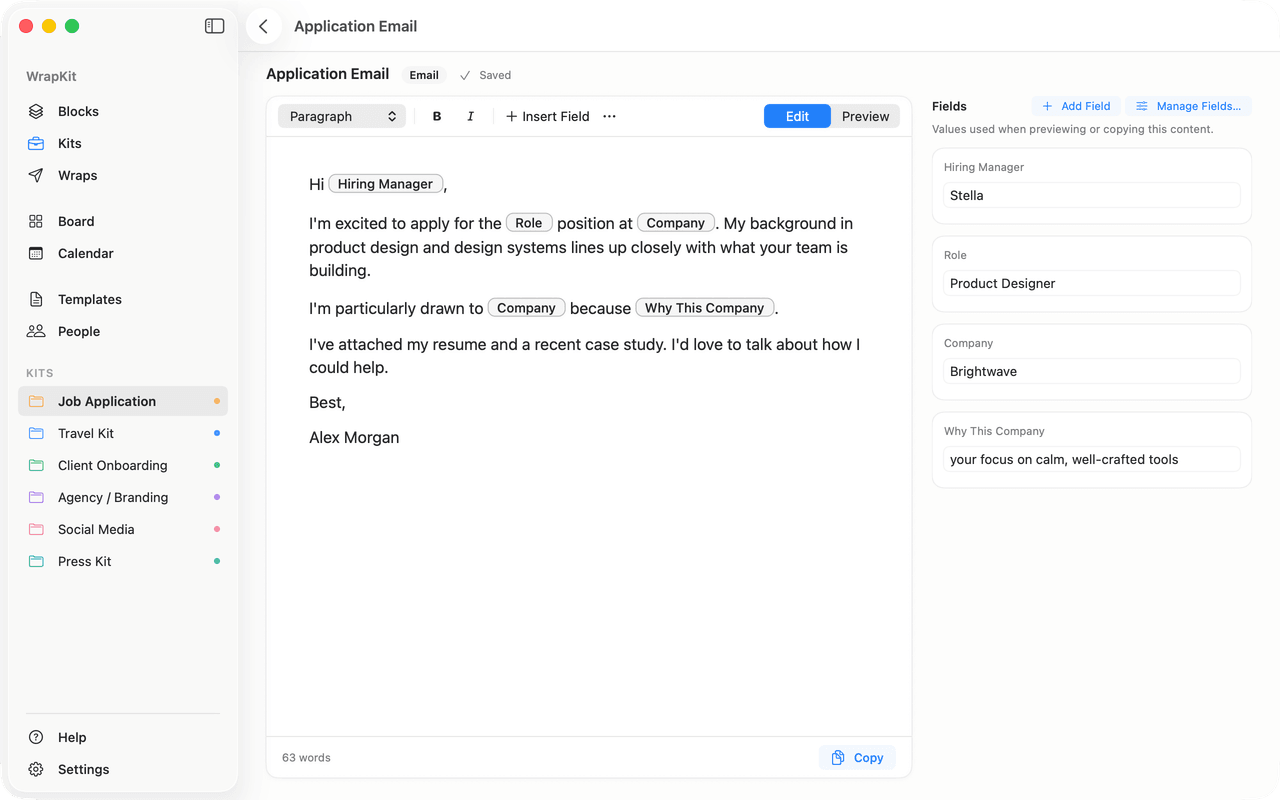
Insert fields into your emails and text, then fill in the values for each situation. WrapKit uses them when you preview or copy the content.

  • Company
  • Role
  • Hiring Manager
  • Contact Email

When you create a Wrap, the same fields personalize the Kit’s content for that one opportunity — and your Kit stays untouched.

Application Email editor with Hiring Manager, Role, Company, and Why This Company fields inserted in the text, and a Fields panel holding the values Stella, Product Designer, and Brightwave.

Wraps

Create a new Wrap from the same Kit for every opportunity.

When a new role, client, brand, or trip comes up, create a Wrap from your Kit. Choose what goes in, personalize it, and send it — the Kit stays ready for next time.

  1. Something comes up
  2. Create a Wrap
  3. Choose & personalize
  4. Send
  5. Track

Example: Job Application Kit, with Wraps for Lumen Labs, Brightwave, and Halcyon.

For example, one Job Application Kit can have separate Wraps for Lumen Labs, Brightwave, and Halcyon, each with its own status.

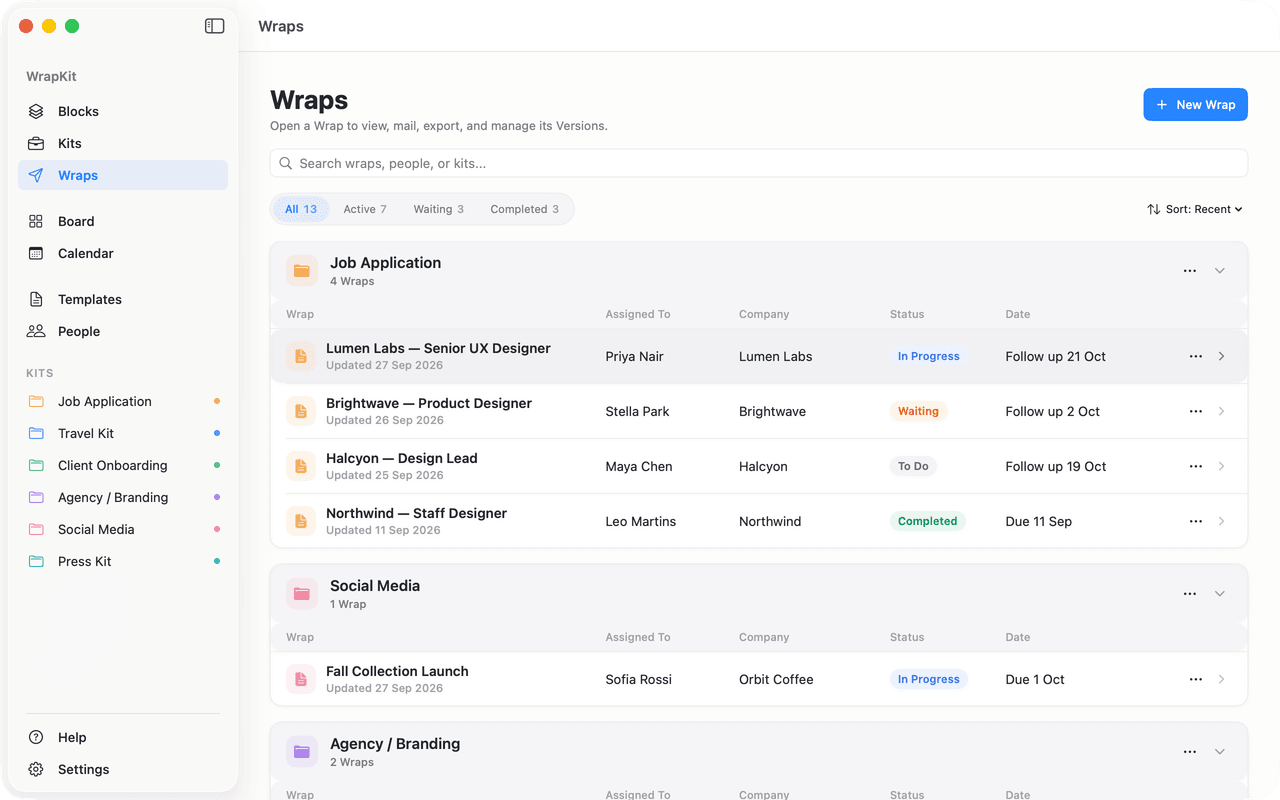
Wraps screen grouping Wraps by Kit. The Job Application Kit has four Wraps — Lumen Labs, Brightwave, Halcyon, and Northwind — each with a person, company, status, and follow-up date.

Tracking

Track every Wrap on your Board and Calendar.

See what’s active, waiting, due, or done — without opening every Wrap.

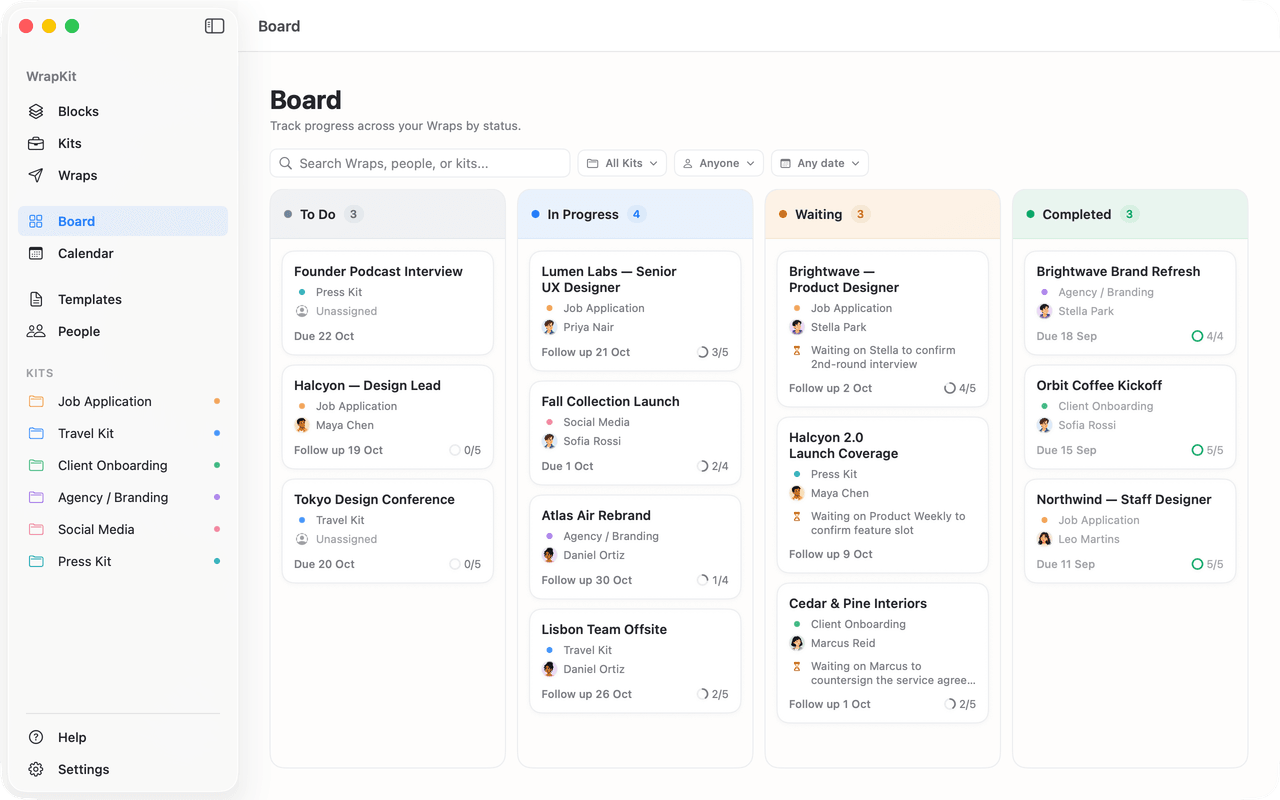
Board with Wraps in To Do, In Progress, Waiting, and Completed columns, each card showing its Kit, person, date, and checklist progress.
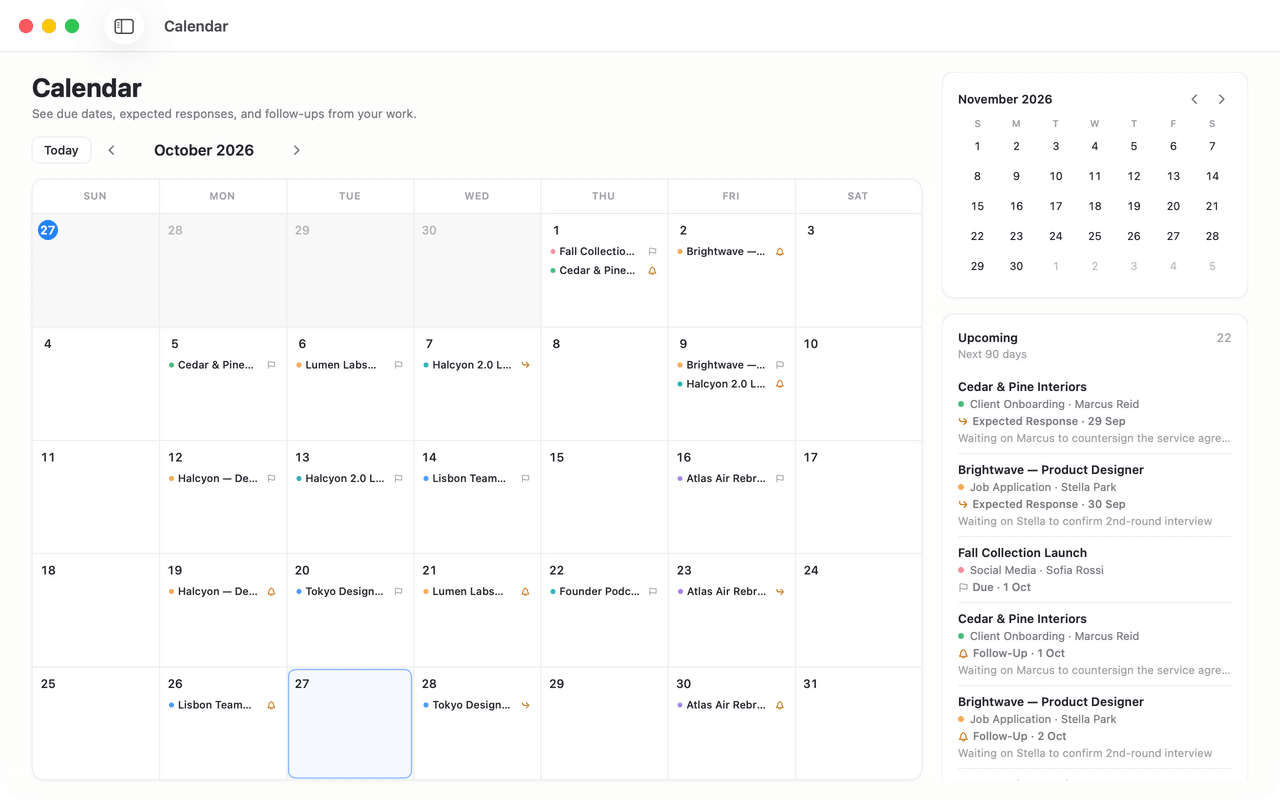
Calendar month view showing Wrap due dates, expected responses, and follow-ups, with an Upcoming list beside it.

Status

Every Wrap is To Do, In Progress, Waiting, or Completed. Move it between Board columns as things change.

  • To Do
  • In Progress
  • Waiting
  • Completed

Important dates

Due dates, expected responses, and follow-ups come together on the Calendar, with an Upcoming list beside it.

People

Assign a Person to a Wrap instead of retyping their details, and see everything in progress with them in one place.

Templates

Start faster with ready-made Kits for the work you do often.

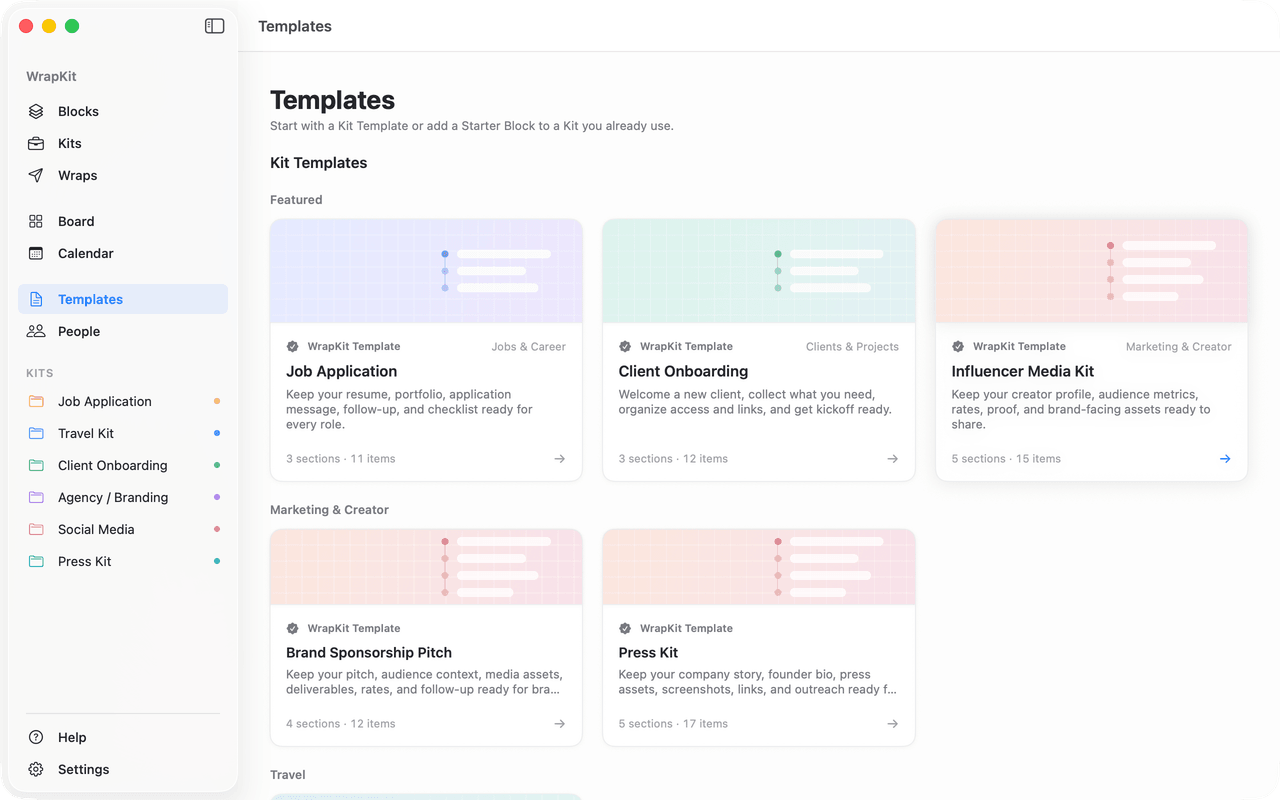
You don’t have to build every Kit from scratch. Start from a Kit Template, then make it yours with your own Blocks. Starter Blocks are included too.

Templates screen with Kit Templates for Job Application, Client Onboarding, Influencer Media Kit, Brand Sponsorship Pitch, and Press Kit.
  • Jobs & Career

    Job Application

    Keep your resume, portfolio, application message, follow-up, and checklist ready for every role.

  • Clients & Projects

    Client Onboarding

    Welcome a new client, collect what you need, organize access and links, and get kickoff ready.

  • Marketing & Creator

    Brand Sponsorship Pitch

    Keep your pitch, audience context, media assets, deliverables, rates, and follow-up ready for brand partnerships.

  • Marketing & Creator

    Influencer Media Kit

    Keep your creator profile, audience metrics, rates, proof, and brand-facing assets ready to share.

  • Marketing & Creator

    Press Kit

    Keep your company story, founder bio, press assets, screenshots, links, and outreach ready for media.

  • Travel

    Travel Kit

    Keep important documents, bookings, links, deadlines, and trip details together for every journey.

Privacy

Built for your Mac.

Your WrapKit workspace is stored locally on your Mac, and file access is always started by you. No WrapKit account is required.

  • Stored on your Mac

    Your Blocks, Kits, Wraps, and the files you add stay in WrapKit on your Mac. There’s no WrapKit cloud.

  • No account

    No sign-up and no WrapKit login. Open the app and start.

  • Access you start

    WrapKit is sandboxed. It opens the files you choose and reads the clipboard only when you ask it to.

  • Purchases via Apple

    Apple processes App Store purchases. RevenueCat manages WrapKit Pro entitlement information using an anonymous ID.

Read the Privacy Policy

Pricing

Start free. Go Pro once.

Use WrapKit free, or unlock Pro Lifetime for $14.99. No subscription.

Free

Everything you need to get started.

  • Up to 2 Kits
  • Up to 5 active Wraps
  • Blocks, Collections, and Templates
  • Board, Calendar, and People
  • Save to Blocks and Quick Access
Get WrapKit (opens the Mac App Store)

Completed Wraps don’t count toward the active limit.

WrapKit Pro Lifetime

$14.99 — one-time

Pay once. Use Pro for life.

  • Unlimited Kits
  • Unlimited active Wraps
  • All WrapKit features
  • Restore your purchase anytime
  • No subscription
Get WrapKit Pro (opens the Mac App Store)

Pricing may vary by App Store region.

Build once.
Reuse whenever the work comes back.

WrapKit 1.1 for Mac. Free to start.

View WrapKit on the Mac App Store (opens the Mac App Store)